Crafting Winter Magic: A Complete Guide to the Ice Skating in Frozen Lake 3D Shadow Box
There is a unique tranquility associated with winter landscapes, particularly the serene image of a lone figure gliding across a frozen lake. Capturing this moment in art requires more than just a flat image; it demands depth, perspective, and a touch of whimsy. This is where the Ice Skating in Frozen Lake 3D Shadow Box comes into play. This innovative paper-cutting template allows crafters, hobbyists, and design enthusiasts to create a stunning, multi-layered piece of art that brings a static scene to life. Whether you are looking to create a framed wall decoration or an illuminated lightbox, this project offers a rewarding blend of creativity and technical precision.
Understanding the Art of 3D Paper Layering
Before diving into the specifics of the ice skater design, it is essential to understand the medium itself. 3D shadow boxes, also known as paper layering or papercutting art, rely on the principle of parallax. By stacking multiple sheets of paper with cut-out designs, artists create a sense of depth that mimics three-dimensional space. Each layer represents a different plane of distance, from the foreground elements to the distant background.
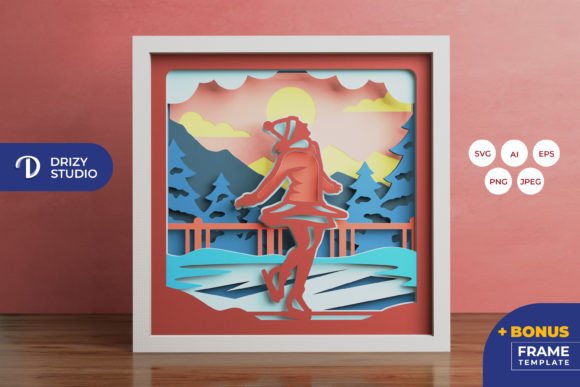
The Ice Skating in Frozen Lake 3D Shadow Box template utilizes this technique to depict a graceful skater against a backdrop of icy textures and winter scenery. With 8 distinct layers, the design provides sufficient complexity to create a rich visual experience without becoming overwhelmingly difficult for intermediate crafters. The interplay of shadows between the layers adds texture and realism, making the scene appear as though you are looking through a window into a frozen world.
Why Choose This Ice Skater Woman Shadow Box Template?
In the realm of digital crafting resources, quality and versatility are paramount. This specific template stands out due to its comprehensive file formats and thoughtful design structure. When you purchase this product, you are not just buying an image; you are acquiring a toolkit for creation. The template is designed to be compatible with both manual and digital cutting methods, ensuring accessibility for all skill levels.
Versatile File Formats for Every Crafter
One of the most significant advantages of this template is the variety of file formats included. Understanding which file to use can significantly impact your workflow:
- SVG (Scalable Vector Graphics): This is the gold standard for users with electronic cutting machines like Silhouette or Cricut. SVG files are vector-based, meaning they can be resized infinitely without losing quality. This is crucial if you wish to adjust the project size while maintaining crisp edges.
- AI and EPS: These formats are ideal for professional designers using Adobe Illustrator or similar vector software. They allow for precise editing of individual paths and nodes before sending the design to a cutter.
- PNG and JPEG: High-resolution raster images (such as the 3000 x 2000 px JPEG provided) are perfect for previewing the design or for those who prefer to print the layers and cut them manually using scissors or an art knife.
All vector files are provided at a base resolution of 714 x 714 px, which corresponds to the finished size of 20.32×20.32 cm (approximately 8x8 inches). This square format is ideal for standard framing options and creates a balanced composition for the skater motif.
From Digital File to Physical Art: The Assembly Process
Creating your Ice Skating 3D Light Box is a journey that transforms digital data into a tangible object. The process is straightforward but requires patience and attention to detail. Here is a step-by-step overview of how to bring this project to life.
- Preparation: Begin by selecting your paper. Cardstock is generally recommended for its rigidity, which helps maintain the separation between layers. You will need eight sheets, potentially in varying shades of white, blue, or gray to enhance the winter theme.
- Cutting: If using a cutting machine, load your SVG file and ensure the aspect ratio is locked. Cut each layer carefully. If cutting by hand, print the PNG or JPEG guides and use a sharp art knife on a cutting mat. Precision is key here, as jagged edges can disrupt the clean lines of the shadow effect.
- Layering: Once all pieces are cut, arrange them in order from back to front. The background layer should be solid or have minimal cutouts, while the foreground layers will have more intricate details, such as the ice skater woman and nearby trees or ice formations.
- Assembly: Use glue or double-sided tape to adhere the layers. Spacer foam or small strips of cardboard can be used between layers to increase the depth if desired. Ensure each layer is aligned perfectly to maintain the visual integrity of the scene.
Transforming the Shadow Box into a Light Box
While the static shadow box is beautiful on its own, adding illumination elevates the project to a new level. By inserting LED strips between the layers, you create an Ice Skating 3D Light Box. The light filters through the cutouts, casting dynamic shadows and highlighting the intricate details of the ice patterns and the skater’s silhouette. This modification turns the artwork into a functional night light or a captivating decorative piece for dark corners of a room.
When adding lights, consider using warm white LEDs for a cozy, nostalgic feel, or cool white LEDs to emphasize the icy, crisp nature of the frozen lake. Ensure the power source is discreetly hidden behind the frame or within the base of the box.
Practical Applications and Gift Ideas
The Ice Skater Woman 3D Shadow Box is not just a craft project; it is a versatile decorative item with numerous applications. Its elegant design makes it suitable for various settings and occasions.
- Home Decor: Hang it in a living room, bedroom, or entryway to add a touch of seasonal charm. The square format fits well in gallery walls or as a standalone focal point.
- Seasonal Gifts: This project makes a thoughtful, handmade gift for friends, family, or someone special during the winter holidays. The effort involved in creating a layered paper art piece demonstrates care and personalization.
- Educational Tool: For educators or parents, this template can serve as an engaging project to teach children about depth, perspective, and fine motor skills. It bridges the gap between digital design and physical craftsmanship.
Common Misconceptions and Tips for Success
Many beginners assume that 3D paper cutting is overly complex or requires expensive equipment. However, this template disproves that notion. While a cutting machine simplifies the process, it is not mandatory. With a steady hand and a sharp blade, anyone can achieve professional-looking results. Additionally, some crafters worry about color accuracy. It is important to note that the final product color may vary slightly due to lighting sources and the specific paper color chosen. This variability is part of the charm of handmade items, allowing each creator to put their unique spin on the design.
Another common assumption is that the SVG file can be altered arbitrarily. While you can resize the design, you must keep the same aspect ratio to prevent distortion of the layers. Maintaining the square proportion ensures that the alignment of the ice skater and the surrounding elements remains consistent across all eight layers.
Conclusion
The Ice Skating in Frozen Lake 3D Shadow Box represents a perfect fusion of traditional paper crafts and modern digital convenience. By providing high-quality files in AI, EPS, PNG, SVG, and JPEG formats, this template empowers creators to produce a sophisticated piece of art regardless of their preferred tools. Whether you choose to assemble it as a classic framed decoration or illuminate it as a glowing lightbox, the result is a captivating depiction of winter grace. Embrace the opportunity to explore the depths of paper layering, and let this ice skater woman glide into your home as a symbol of creativity and calm.