Crafting Spooky Depth: The Ultimate Guide to 3D Halloween House Laser Cut Templates
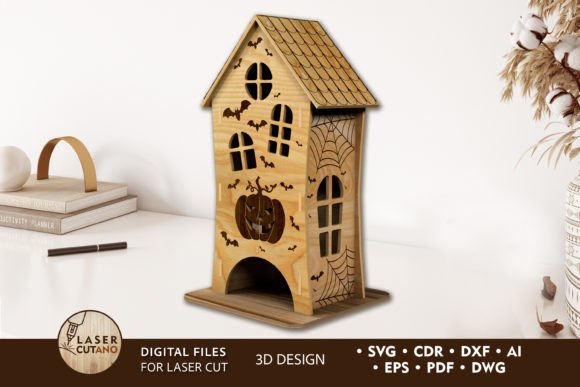
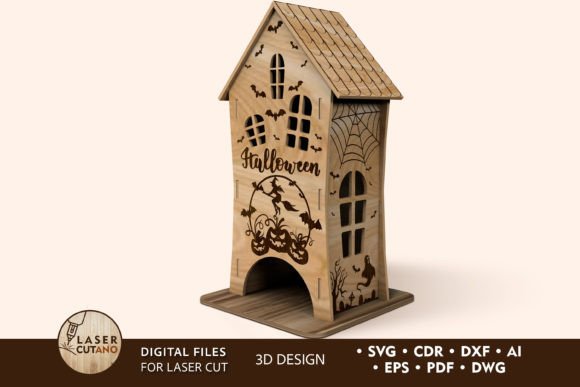
Halloween is more than just a holiday; it is a season of creativity, atmosphere, and meticulous decoration. For makers, crafters, and DIY enthusiasts, the quest for the perfect spooky display often leads to complex projects that require precision and patience. Among the most captivating decorations are miniature haunted houses—structures that evoke mystery and charm in equal measure. However, building these intricate models from scratch can be daunting. This is where the Halloween 3D Design House Template becomes an invaluable asset. These digital multilayer layout files are specially prepared for laser cutters, CNC router machines, and other cutting technologies, transforming a flat sheet of material into a stunning three-dimensional centerpiece.
The Evolution of Halloween Decor: From Flat to Dimensional
Creating a Halloween house is a time-honored tradition, but the methods have evolved significantly. In the past, decorators relied on cardboard boxes, paper maché, or pre-made plastic ornaments. While functional, these materials often lacked the refined aesthetic that modern crafters desire. Today, the integration of digital design with physical fabrication allows for a level of detail previously reserved for professional prop makers. By utilizing a laser cut Halloween decoration template, you bridge the gap between digital precision and tactile artistry.
The core appeal of these 3D designs lies in their multilayered construction. Unlike simple silhouette cutouts, a 3D model builds depth through stacking. Each layer adds shadow, texture, and structural integrity. When light passes through or reflects off these layers, the result is a dynamic visual experience that changes depending viewing angles. This complexity is what makes the 3D HALLOWEEN Digital multilayer layout files so popular among hobbyists who use Glowforge, xTool, or industrial CNC machines. The design is not just a shape; it is an architectural plan for a miniature world.
Understanding the Technical Specifications
To achieve the best results, it is crucial to understand the technical requirements of the template. These designs are engineered with specific tolerances and dimensions in mind. The finished product typically measures approximately 4.5 x 9 x 3 inches, making it a compact yet impactful addition to mantels, shelves, or tabletop displays. This size is ideal for indoor decoration, providing enough detail to be appreciated up close without overwhelming the space.
The design is optimized for a material thickness of 3 mm. This specification is critical. If you use material that is too thick, the tabs and slots may not fit together, requiring excessive force that could break delicate elements. If the material is too thin, the structure may lack stability, and the visual depth will be compromised. While the primary recommendation is 3mm, the design can accommodate 2mm thickness with minor adjustments or shimming, though 3mm remains the gold standard for rigidity and ease of assembly.
Compatible File Formats for Every Machine
One of the greatest advantages of purchasing this template is its versatility. After payment, you receive a .zip file containing the design in a comprehensive array of formats: .AI, .SVG, .DXF, .DWG, .CDR, .EPS, and .PDF. This ensures compatibility with virtually any software or hardware setup.
- .SVG and .DXF: Ideal for users of Glowforge, LightBurn, and most consumer-grade laser cutters. These formats preserve vector paths cleanly.
- .AI and .EPS: Perfect for Adobe Illustrator users who wish to modify the design, add custom text, or adjust vector nodes before cutting.
- .DWG and .CDR: Essential for professionals using AutoCAD or CorelDRAW, common in industrial CNC environments.
- .PDF: Useful for quick previews or printing reference guides.
It is important to remember to unzip the folder before attempting to use the files. Trying to load a compressed archive directly into your design software will result in errors. Once extracted, you can import the file that best suits your workflow.
Material Selection: Beyond Basic Wood
While the template is designed with wood in mind, its application is not limited to timber. The recommended materials include Plywood, MDF, Acrylic, Plexiglas, and even Metal. Each material offers a distinct aesthetic and requires different machine settings.
Plywood and MDF are the most common choices for this type of project. They are affordable, easy to cut, and hold glue well. Birch plywood, in particular, offers a beautiful grain that enhances the rustic, haunted look of a Halloween house. When using wood, ensure it is free of large knots in the areas where intricate details are cut, as these can cause breakage.
Acrylic and Plexiglas provide a modern, eerie twist. Imagine a translucent ghost house glowing from within when backlit by an LED strip. However, working with acrylic requires careful attention to flame polishing or masking to prevent smoke stains on the surface. The engraving capabilities of the design also shine on acrylic, allowing for frosted details that catch the light beautifully.
For those with fiber laser capabilities, Metal sheets can be used to create industrial-style haunted structures. This is an advanced application, requiring precise power settings, but the durability and unique finish of metal can elevate the design to a high-end art piece.
Assembly and Finishing: Bringing the Design to Life
The creation process does not end when the laser stops cutting. In fact, the assembly phase is where the magic happens. Because this is a multilayer model, each layer must be glued sequentially. It is highly recommended to paint before gluing. Trying to paint the nooks and crannies of an assembled 3D house is frustrating and often results in uneven coverage. By painting the individual layers flat on your workbench, you ensure every edge and engraved detail is coated evenly.
Consider using contrasting colors for different layers to enhance the 3D effect. For example, a dark grey base layer with a lighter grey top layer can simulate stone masonry. Alternatively, traditional Halloween colors like orange, black, and purple can be used for a more festive vibe. Once painted and dried, use a high-quality wood glue or cyanoacrylate (super glue) for acrylics to bond the layers. Align the registration holes carefully to ensure the house stands straight.
Scaling and Customization
A common question among users is whether they can change the size of the design. The answer is yes, but with caveats. You can increase the size of the design relatively safely, provided your machine bed is large enough. Larger houses make impressive centerpieces for parties or entryways. However, reducing the design requires caution. The template contains thin elements—such as window frames, roof shingles, and decorative spires. If you scale down too much, these elements may become too fragile to survive the cutting process or handling during assembly. Always test cut a small section if you plan to significantly alter the dimensions.
Integrating into Modern Maker Workflows
The Halloween 3D Design House Template fits seamlessly into modern maker workflows. For small business owners, these files offer a scalable product line. You can produce batches of houses during the off-season and sell them at fall festivals or online marketplaces. The digital nature of the product means zero inventory cost until a sale is made, and the production time per unit is minimal once the machine is calibrated.
For educators and workshop leaders, this project serves as an excellent teaching tool. It introduces students to concepts of spatial reasoning, vector design, and material science. The step-by-step assembly process teaches patience and fine motor skills, while the customization aspect encourages creative expression.
Furthermore, the versatility of the file formats supports a wide range of industries. Architects might use similar multilayer techniques for site models, while theatrical set designers could scale up these principles for stage props. The skills honed by creating a small Halloween house are transferable to larger, more complex fabrication projects.
Final Thoughts on Precision and Creativity
Whether you are a seasoned CNC operator or a beginner with your first desktop laser cutter, the 3D HALLOWEEN multilayer layout offers a rewarding challenge. It combines the technical satisfaction of precise machining with the artistic joy of seasonal decoration. By respecting the material thickness recommendations, choosing the right finish, and taking care during assembly, you can create a piece that is not just a decoration, but a testament to your craftsmanship. As the leaves turn and the air grows crisp, let your creativity shine through these intricate, layered designs, bringing a touch of haunted elegance to your home.