Mastering the 3dcolorful Seashells on the Sand Tumbler Design for Flawless Sublimation
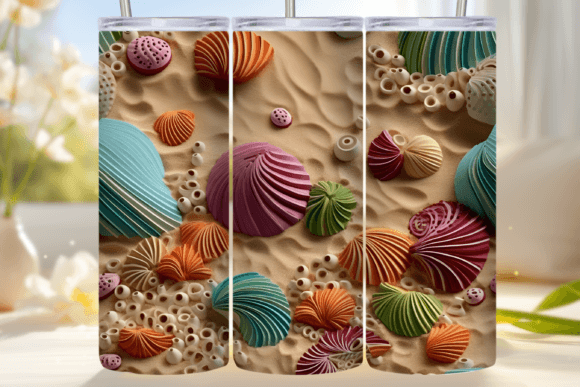
The allure of coastal aesthetics never fades, and in the world of custom drinkware, few motifs capture that breezy, vacation-ready vibe quite like a vibrant beach scene. The 3dcolorful Seashells on the Sand Tumbler design has become a staple for creators looking to add a splash of summer to their product lines. However, simply downloading a file and hitting "print" is rarely enough to guarantee a professional-grade result. Many entrepreneurs and hobbyists stumble not because the design lacks quality, but because they overlook the technical nuances of sublimation printing on curved surfaces.
Whether you are a seasoned small business owner or a beginner just setting up your first heat press, understanding the specifics of this digital asset is crucial. This guide walks you through the common pitfalls associated with using high-resolution PNG wraps and offers practical advice to ensure your final product looks as crisp and colorful as the digital preview.
Understanding the Digital Asset
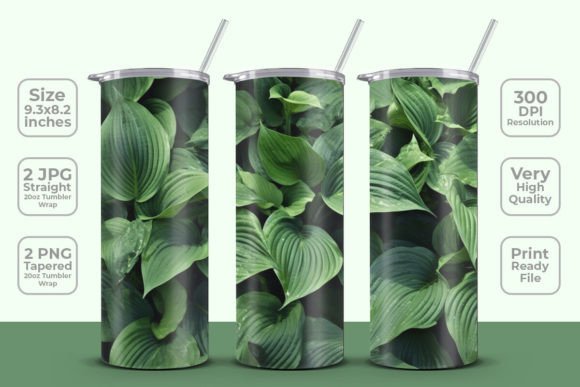
Before diving into the printing process, it is essential to understand what you are working with. The 3d colorful seashells on the sand Tumbler Wrap 20 oz Skinny Tumbler Sublimation Design is not just a pretty picture; it is a technical template. When you purchase this instant digital download, you typically receive two distinct PNG files: one optimized for a straight 20oz tumbler and another for a tapered 20oz tumbler. Both files are delivered at a high resolution of 300 DPI, which is the industry standard for sharp, non-pixelated prints.
The dimensions, usually around 9.3 x 8.2 inches, are pre-calculated to account for the circumference and height of standard skinny tumblers. This pre-sizing saves you hours of guesswork in graphic design software. However, the convenience of a pre-sized wrap can lead to complacency. Assuming that "one size fits all" is the first mistake many makers make. While the file can be resized, doing so without understanding aspect ratios and printer limitations can lead to distorted images or poor ink saturation.
Common Mistakes and How to Avoid Them
Even with a high-quality source file, the transition from screen to physical product is where errors often occur. Here are the most frequent issues creators face and how to correct them.
Ignoring the Difference Between Straight and Tapered Wraps
A critical error is using the straight wrap file on a tapered tumbler, or vice versa. A straight tumbler has a consistent diameter from top to bottom, meaning the design does not need to compensate for curvature changes. A tapered tumbler, however, narrows toward the base. If you apply a straight design to a tapered cup, the image will stretch awkwardly at the top or bunch up at the bottom, breaking the visual continuity of the seashells and sand.
The Fix: Always verify the physical shape of your blank tumbler before selecting your file. If you are using a tapered 20oz skinny tumbler, strictly use the tapered PNG provided in the download package. This ensures the 3D effect of the seashells remains proportionate and realistic across the entire surface.
Neglecting Color Profile Settings
Sublimation printers rely on specific color profiles to translate digital colors into dye. A common oversight is printing directly from a design program set to RGB (Red, Green, Blue) without converting to CMYK (Cyan, Magenta, Yellow, Key/Black) or the specific ICC profile recommended by your ink manufacturer. The 3dcolorful Seashells on the Sand Tumbler design features vibrant blues and warm sandy tones. If printed incorrectly, these colors can appear washed out or muddy.
The Fix: Calibrate your monitor and ensure your printing software is set to the correct color profile for your sublimation paper and ink combination. Perform a test print on plain paper first to check color accuracy before committing to expensive sublimation sheets.
Improper Heat Press Technique
The design is only half the battle; the application is the other. Many beginners struggle with uneven pressure or incorrect temperature settings. If the heat press is not applying even pressure across the entire wrap, parts of the seashell design may appear faint or blurred. Additionally, failing to secure the paper tightly can cause "ghosting," where the image shifts slightly during the press, resulting in a double-exposed look.
The Fix: Use high-quality heat-resistant tape to secure the sublimation paper firmly against the tumbler. Ensure your heat press is calibrated to the manufacturer’s recommended temperature and time—typically around 380°F for 180-200 seconds, though this varies by equipment. Rotate the tumbler if your press does not have a 360-degree element to ensure even heat distribution.
Optimizing for Quality and Efficiency
To get the most out of your 3d colorful seashells on the sand Tumbler Wrap, consider the workflow beyond just printing. Efficiency in your production line can significantly impact your profitability and customer satisfaction.
- Pre-cut Your Paper: Since the file size is standardized at 9.3 x 8.2 inches, pre-cutting your sublimation paper to these dimensions can save time during high-volume production runs.
- Check for White Spaces: Ensure your tumbler blanks are coated for sublimation. Uncoated stainless steel will not absorb the dye, resulting in a wipe-off mess. Always verify the quality of your blanks before starting a large batch.
- Resize with Caution: While the prompt notes that the design can be resized to fit different sizes, maintain the aspect ratio. Stretching the image to fit a non-standard tumbler will distort the roundness of the seashells, making them look oval and unnatural.
Final Checks Before You Press
Before you commit to a full production run, take a moment to evaluate your setup. Ask yourself: Is the image mirrored? Sublimation requires mirror imaging so that the design reads correctly when transferred. Is the paper dry? Humidity can affect ink transfer, leading to blotchy results. Have you cleaned the tumbler surface? Oils from fingerprints can repel ink, leaving unsightly marks in the sandy background of the design.
By paying attention to these details, you transform a simple digital download into a premium physical product. The 3dcolorful Seashells on the Sand Tumbler design offers a beautiful, ready-to-use solution for creators, but its potential is only realized through careful execution. Avoiding these common mistakes ensures that your final product is not just another tumbler, but a high-quality item that customers will love to show off.
Remember, the goal is consistency. Whether you are making one tumbler for a friend or fifty for a local market, adhering to these best practices will help you build a reputation for quality and reliability. Take the time to master the technical side of sublimation, and let the vibrant, detailed artistry of the seashell design do the rest.