Mastering the 3D Greenery Tumbler Wrap for Professional Sublimation Results
In the competitive world of custom drinkware, visual appeal is often the deciding factor between a browser and a buyer. The 3D Greenery Tumbler Wrap has emerged as a standout design choice for creators looking to blend modern aesthetics with natural elements. However, possessing a high-quality digital file is only half the battle. Many entrepreneurs and hobbyists stumble not because their designs are lacking, but because they misunderstand the technical nuances of applying these wraps to tapered versus straight tumblers. This guide aims to correct common misconceptions and provide actionable advice to ensure your final product meets professional standards.
Understanding the Difference Between Straight and Tapered Files
One of the most frequent errors beginners make is assuming that a single image file can be universally applied to any 20oz tumbler. This is a critical misunderstanding that leads to distorted graphics and wasted materials. A standard 20oz skinny tumbler is rarely a perfect cylinder; it is usually tapered, meaning the diameter at the top is slightly different from the diameter at the bottom.
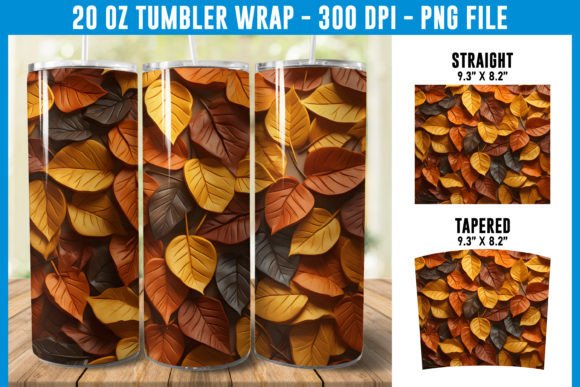
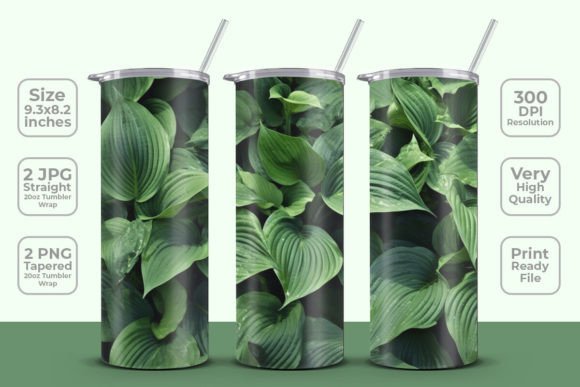
When you use a straight JPG wrap on a tapered tumbler, the image will stretch or compress unevenly. This results in the greenery pattern looking warped, particularly near the edges. Conversely, using a tapered PNG on a straight surface may cause alignment issues or gaps. The 3D Greenery Tumbler Wrap package typically includes both formats for this exact reason. It provides two JPGs for straight applications and two PNGs specifically designed for tapered contours. Ignoring this distinction compromises the structural integrity of your design’s visual appeal.
To avoid this, always measure your blank tumbler before printing. If your supplier specifies that the tumbler is "tapered," you must use the tapered file included in the download. If it is a true straight-wall cylinder, the straight JPG is your correct choice. Taking this extra step ensures that the lush, three-dimensional foliage effect remains consistent and realistic around the entire circumference of the cup.
The Importance of Resolution and DPI in Print Quality
Another overlooked detail is the resolution of the source file. In sublimation printing, pixelation is the enemy of professionalism. A design that looks crisp on your computer screen can appear blurry or jagged when printed if the resolution is insufficient. The provided 3D Greenery Tumbler Wrap files are delivered at 300 DPI (dots per inch), which is the industry standard for high-quality print-ready documents.
A common mistake occurs when users resize these images incorrectly in editing software. If you upscale a low-resolution image, you introduce artifacts. If you downscale a high-resolution image without maintaining the aspect ratio, you distort the pattern. Always check that your canvas size matches the physical dimensions of the wrap—specifically the 9.3 x 8.2 inches specified in the product details. Working at 100% scale with a 300 DPI file ensures that every leaf and shadow in the greenery design retains its sharpness.
Furthermore, ensure your printer settings match the file quality. Using a draft mode or low-quality ink setting on your sublimation printer will negate the benefits of a high-resolution file. For the best results, select "high quality" or "photo" settings in your printer driver to fully utilize the detail present in the original design.
Color Management and Substrate Compatibility
Even with the perfect file and correct dimensions, color discrepancy remains a significant hurdle. What you see on your monitor is rarely what comes out of the printer. This is due to the difference between RGB (screen colors) and CMYK or sublimation color profiles. The 3D Greenery Tumbler Wrap features rich, deep greens and earthy tones that can shift if not managed properly.
Many creators skip the test print phase, leading to batches of tumblers with muted or washed-out colors. To mitigate this, always perform a test print on a small piece of sublimation paper. Check the vibrancy of the greens and the contrast of the shadows. If the colors appear dull, adjust your printer’s color profile or saturation settings before committing to a full production run.
Additionally, the quality of the tumbler blank itself plays a crucial role. Not all polyester-coated tumblers accept ink equally. Lower-quality blanks may result in color bleeding or a lack of vibrancy, regardless of how good your digital file is. Invest in reputable blanks that are known for consistent coating quality. This ensures that the intricate details of the 3D greenery design transfer cleanly and vividly.
Application Techniques for a Seamless Finish
Printing is only half the process; application is where many projects fail. Air bubbles, wrinkles, and misalignment can ruin an otherwise perfect print. When applying the 3D Greenery Tumbler Wrap, precision is key. Start by cleaning the tumbler thoroughly with alcohol to remove any oils or dust. Any residue can prevent the ink from bonding correctly or cause the shrink wrap to slip during heating.
Use high-quality heat-resistant tape to secure the paper. Do not rely on standard Scotch tape, as it can leave residue or fail under high heat. Align the seam carefully, ensuring the pattern matches up seamlessly. For tapered tumblers, pay extra attention to the top and bottom edges, as these are prone to lifting if not secured tightly.
Finally, adhere strictly to the recommended time and temperature settings for your specific tumbler brand. Over-pressing can cause scorching, while under-pressing leads to ghosting. Typically, sublimation requires temperatures around 380°F to 400°F for several minutes, but always consult your blank supplier’s guidelines. Consistency in your pressing technique will ensure that every tumbler you produce maintains the high-quality standard expected by your customers.
Making the Right Choice for Your Business
Choosing the right design assets is a strategic business decision. The 3D Greenery Tumbler Wrap offers versatility for various markets, from eco-conscious consumers to corporate gifts. By understanding the technical requirements—file types, resolution, color management, and application—you position yourself to deliver superior products. Avoid the pitfalls of generic approaches and embrace the specifics of sublimation printing. This attention to detail not only enhances the aesthetic value of your items but also builds trust and loyalty among your clientele. Remember, professionalism lies in the details, and mastering these fundamentals is the key to long-term success in the custom drinkware industry.