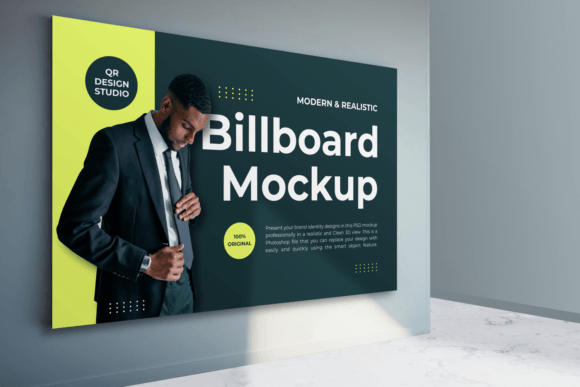
Indoor Billboard Mockup: Presenting Brand Identity in Realistic 3D
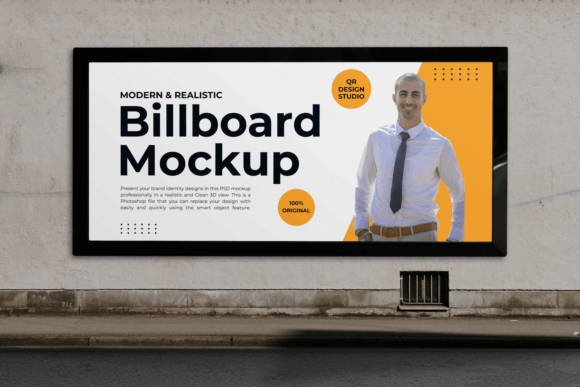
Visualizing a design concept is often the hardest part of the creative process. You have spent hours perfecting the typography, selecting the right color palette, and refining the logo placement. But when you present that flat JPEG to a client or stakeholder, it can feel disconnected from reality. This is where an Indoor Billboard Mockup becomes an essential tool in your workflow. It bridges the gap between a digital file and a physical presence, allowing you to showcase your brand identity designs in a professional, realistic, and clean 3D view.
For freelancers, marketing agencies, and small business owners, the ability to demonstrate how a design will look in its intended environment is not just a nice-to-have; it is a critical component of effective communication. A high-quality Photoshop file with smart object capabilities allows you to replace your design easily and quickly, turning a static image into a compelling visual narrative.
Why Context Matters in Design Presentation
When you send a standalone logo or poster design to a client, they are forced to imagine its scale and impact. Most clients do not have the trained eye to visualize how a two-dimensional graphic translates into a three-dimensional space. They might worry about readability, color clash with surrounding walls, or overall prominence. By using an indoor billboard mockup, you remove this cognitive load.
You are showing them the finished product before it is even printed. This builds trust and confidence. When a client sees their brand displayed on a sleek, modern billboard within a realistic interior setting—complete with accurate lighting, shadows, and perspective—they are more likely to approve the design. It shifts the conversation from "Does this look good?" to "This looks like it belongs in our space."
Real-World Use Cases for Indoor Billboards
The versatility of a well-organized PSD file means it can serve various professionals across different industries. Here is how different users can leverage this tool effectively.
Corporate Branding and Office Interiors
Large corporations and startups alike invest heavily in office culture and branding. An indoor billboard is a common feature in lobbies, conference rooms, and open-plan workspaces. If you are a brand designer working on a corporate identity package, using this mockup allows you to show how the company’s mission statement or core values would look displayed prominently in their headquarters. It helps HR teams and facility managers visualize the impact of large-format graphics on employee morale and visitor impressions.
Retail and Pop-Up Shops
For retail entrepreneurs, every square foot of store space is an opportunity to communicate with customers. Indoor billboards are frequently used in shopping malls and flagship stores to highlight seasonal promotions, new arrivals, or brand stories. A fashion blogger or small boutique owner can use this mockup to plan their visual merchandising strategy. By testing different designs in the mockup, they can determine which colors and messages stand out best against the store’s existing decor without wasting money on multiple print tests.
Event Marketing and Trade Shows
Trade shows and exhibitions are competitive environments where visibility is key. Exhibitors often use large indoor displays to attract foot traffic. Marketing professionals can use this tool to pitch booth designs to clients. By placing the client’s logo and key messaging onto a realistic indoor billboard structure, you provide a clear preview of how the booth will dominate the space. This is particularly useful for securing sponsorship deals, as sponsors want to see exactly how their brand will be represented in a high-traffic area.
Educational and Institutional Settings
Schools, universities, and museums also utilize large-format indoor displays for wayfinding, announcements, and educational content. An educator or administrator designing a campaign for a campus event can use the mockup to present ideas to the board or student council. It provides a professional polish to internal presentations, making the proposed designs feel tangible and ready for implementation.
Technical Features That Enhance Workflow
The effectiveness of any mockup depends on its technical quality. A superior Indoor Billboard Mockup is not just a pretty picture; it is a functional tool designed for efficiency. The ideal file should be a PSD with dimensions around 3000x2000 pixels at 300 DPI. This resolution ensures that the final output is crisp and suitable for high-quality presentations or portfolio pieces.
The most critical feature is the use of Smart Objects. This functionality allows you to double-click a layer, paste your design, and save. The mockup automatically wraps your design around the structure, applying the correct perspective and distortion. This saves hours of manual adjustment and ensures consistency across multiple design variations.
Furthermore, flexibility is key. Look for files where layers are fully organized and labeled. You should be able to increase or reduce shadows, adjust lighting effects, and change texture or background colors. This level of control means you can adapt the mockup to match the specific lighting conditions of your client’s actual space. If their office has warm, ambient lighting, you can tweak the mockup to reflect that, creating a seamless blend between the digital design and the physical environment.
Considerations Before Choosing a Mockup
While the benefits are clear, selecting the right mockup requires some consideration. Not all PSD files are created equal. Here is what you should evaluate before downloading or purchasing:
- Lighting Consistency: Ensure the lighting in the mockup matches the mood of your design. A bright, energetic ad might look out of place in a dimly lit, moody corridor.
- Perspective Accuracy: The angle of the billboard should be natural. Extreme angles can distort your design too much, making it hard for viewers to read the content.
- Customizability: Check if the background is editable. Being able to change the wall color or floor texture allows you to tailor the scene to your specific brand guidelines.
- File Organization: A messy file with hundreds of unnamed layers is a productivity killer. Opt for mockups with well-organized groups and clear instructions.
Maximizing Impact with Realistic Details
To get the most out of your Indoor Billboard Mockup, pay attention to the details. Small adjustments can make the difference between a good presentation and a great one. For instance, consider the scale of the text. In a real-world setting, text needs to be readable from a distance. Use the mockup to test font sizes and contrast levels. If the text disappears into the shadows or blends with the background, you know you need to adjust your design before sending it to print.
Additionally, think about the surrounding elements. If the mockup allows for movable objects, consider adding subtle contextual clues. A plant in the corner, a piece of furniture, or people walking by can add life to the scene. These elements help the viewer understand the scale and function of the billboard within the space.
Ultimately, the goal is to create a visual that feels authentic. When clients see a design that looks like it already exists in their world, they are more likely to connect with it emotionally. This emotional connection is what drives approval and sales. By investing time in high-quality visualization tools, you are not just showing a design; you are selling a vision.
Conclusion
An Indoor Billboard Mockup is more than a digital asset; it is a communication tool that enhances clarity, professionalism, and persuasion. Whether you are a freelancer pitching to a new client, a marketer planning a retail campaign, or an educator designing campus signage, this tool allows you to present your work in its best light. By leveraging smart objects, adjustable lighting, and realistic 3D perspectives, you can transform flat designs into immersive experiences. Remember to choose files that offer flexibility and high resolution, and always tailor the mockup to reflect the real-world context of your project. In doing so, you elevate your presentations and build stronger connections with your audience.