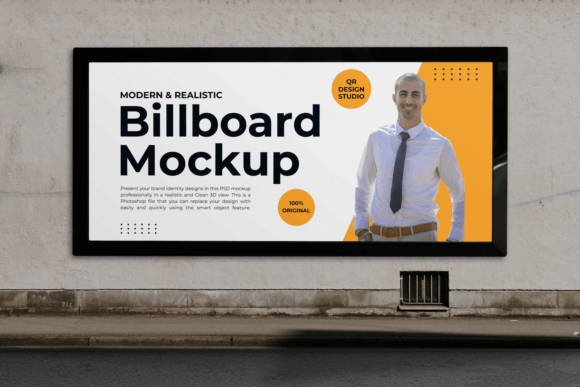
Elevating Brand Visibility with a Professional Street Wall Billboard Mockup
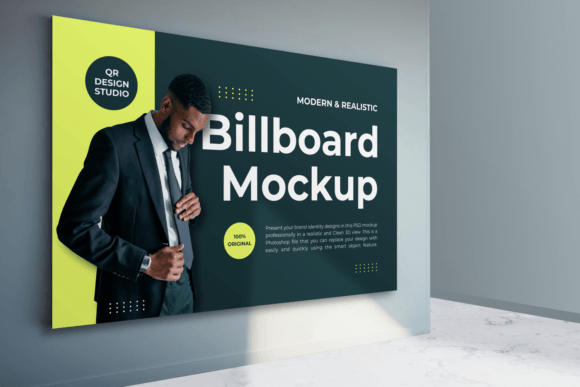
In the fast-paced world of digital marketing and brand development, the gap between a concept and its real-world application can often feel vast. Designers and marketers spend hours perfecting typography, color palettes, and imagery, yet presenting these elements in a way that resonates with clients or stakeholders remains a challenge. This is where the Street Wall Billboard Mockup becomes an indispensable tool. It bridges the divide between abstract design files and tangible, impactful advertising. By placing your creative work into a realistic urban environment, you provide viewers with an immediate sense of scale, context, and potential impact.
The demand for high-quality visual presentations has never been higher. As businesses compete for attention in increasingly saturated markets, the ability to showcase a brand identity professionally is no longer just a nice-to-have—it is a necessity. A well-executed mockup does more than display a logo; it tells a story about how that brand interacts with its environment. Whether you are a freelance graphic designer pitching to a new client, a marketing agency preparing a campaign proposal, or an entrepreneur visualizing your next outdoor ad, using a Street Wall Billboard Mockup allows you to present your ideas with clarity and confidence.
The Shift Toward Realistic Context in Design Presentation
Historically, design presentations were often flat and two-dimensional. Designers would send over JPEGs or PDFs of their layouts, leaving much to the imagination regarding how those designs would look in physical spaces. However, user expectations and professional standards have evolved. Today’s clients and consumers are visually sophisticated. They expect to see how a design lives in the real world before committing resources to production. This shift has driven the adoption of advanced mockup tools that offer clean 3D views and photorealistic details.
The modern workflow prioritizes efficiency without sacrificing quality. Professionals need tools that allow them to iterate quickly. A Street Wall Billboard Mockup fits seamlessly into this workflow by offering a Photoshop file that is both powerful and user-friendly. With features like smart objects, designers can replace placeholder images with their own designs in seconds. This ease of use means that multiple concepts can be tested and presented rapidly, facilitating faster decision-making and smoother client approvals. The ability to visualize a billboard on a textured street wall adds a layer of authenticity that flat designs simply cannot achieve.
Key Features That Enhance Creative Flexibility
Not all mockups are created equal. The effectiveness of a Street Wall Billboard Mockup lies in its technical specifications and organizational structure. High-resolution output is critical for professional presentations. A standard requirement for top-tier mockups is a resolution of at least 300 DPI, ensuring that every detail remains crisp even when zoomed in or printed for physical portfolios. For instance, a PSD file sized at 3000x2000 pixels provides ample space for intricate design work while maintaining optimal performance in editing software.
One of the most significant advantages of using a well-structured mockup is the control it offers over environmental factors. Realism is not just about the design itself but also about how light and shadow interact with it. Advanced mockups allow users to increase or reduce shadows, adjust lighting angles, and apply various effects to match the time of day or weather conditions depicted in the scene. This level of customization ensures that the final presentation aligns perfectly with the mood and tone of the brand being showcased.
- Smart Object Integration: Enables quick and non-destructive editing of the design layer.
- High Resolution: 300 DPI ensures print-ready quality and sharp on-screen visuals.
- Customizable Environment: Users can change textures or background colors to suit specific branding needs.
- Organized Layers: Fully layered files make it easy to navigate and modify individual elements.
- Movable Objects: Allows for composition adjustments to highlight different aspects of the design.
These features collectively empower creators to produce polished, professional-grade presentations without needing extensive 3D modeling skills. The focus remains on the design, while the mockup handles the heavy lifting of realism and perspective.
Practical Implications for Brands and Creators
For businesses, the use of a Street Wall Billboard Mockup extends beyond mere aesthetics. It serves as a strategic tool for risk mitigation and budget optimization. Before investing in expensive outdoor advertising slots, companies can use mockups to simulate how their ads will appear in various locations. This pre-visualization helps identify potential issues with readability, color contrast, or visual clutter in busy urban environments. By addressing these concerns early, brands can refine their messaging and design to maximize impact.
Freelancers and agencies also benefit significantly from incorporating these tools into their service offerings. Presenting a design within a realistic context demonstrates professionalism and attention to detail. It helps clients visualize the end result, reducing the likelihood of misunderstandings or revision requests based on unrealistic expectations. Moreover, having a library of high-quality mockups allows creatives to diversify their portfolios, showcasing their work in different settings and appealing to a broader range of potential clients.
Consider the scenario of a startup launching a new product. Instead of describing how their billboard campaign will look, they can present a series of images showing the ad on different street walls across the city. This approach not only builds excitement but also provides concrete evidence of the campaign’s potential reach and visibility. It transforms a theoretical plan into a tangible asset that stakeholders can engage with emotionally and intellectually.
Adapting to Modern Design Trends and Technology
The evolution of design technology has made high-quality mockups more accessible than ever. In the past, creating a realistic 3D render required specialized software and significant technical expertise. Today, Photoshop-based mockups democratize this process, allowing anyone with basic editing skills to produce stunning visuals. This accessibility has led to a surge in the quality of independent design work, leveling the playing field for smaller studios and solo practitioners.
Furthermore, the trend toward minimalism and clean aesthetics in design has influenced the development of mockup templates. Modern Street Wall Billboard Mockups often feature uncluttered backgrounds and neutral tones, ensuring that the viewer’s attention remains focused on the design itself. This alignment with contemporary design preferences makes these tools particularly relevant for brands aiming for a sleek, modern image.
As remote work becomes more prevalent, the ability to communicate ideas visually has become even more critical. Digital presentations replace face-to-face meetings, making it essential that every slide and image communicates clearly and effectively. A realistic mockup acts as a universal language, transcending verbal descriptions and ensuring that all parties share a common understanding of the project’s direction.
Best Practices for Using Billboard Mockups Effectively
To get the most out of a Street Wall Billboard Mockup, it is important to approach its use with intentionality. Start by selecting a mockup that complements the style and tone of your design. A gritty, urban wall might suit a bold, edgy brand, while a clean, modern facade may be better for a corporate or luxury identity. Pay attention to lighting and perspective; ensure that the angle of the billboard matches the viewpoint of your target audience.
When editing, take advantage of the smart object feature to maintain the integrity of your original design file. This non-destructive workflow allows you to experiment with different variations without losing your initial work. Additionally, do not overlook the importance of post-processing. Adjusting brightness, contrast, and saturation can help integrate your design more naturally into the scene, making it look like it was truly photographed on location rather than digitally inserted.
- Choose a mockup that aligns with your brand’s aesthetic and target environment.
- Use smart objects to insert your design, ensuring high resolution and correct proportions.
- Adjust shadows and lighting to match the ambient conditions of the mockup scene.
- Review the composition from different perspectives to ensure readability and impact.
- Export final images in appropriate formats for web or print presentation.
By following these steps, you can create compelling visual narratives that resonate with your audience and elevate your professional profile. The Street Wall Billboard Mockup is more than just a template; it is a catalyst for better communication, smarter design decisions, and stronger brand identities.
In conclusion, integrating realistic mockups into your design process is a forward-looking strategy that addresses the current needs of modern marketing and creative practices. It empowers professionals to present their work with precision and flair, fostering trust and engagement with clients and consumers alike. As technology continues to advance, the tools available to creators will only become more sophisticated, but the fundamental principle remains the same: context matters. By placing your designs in the real world, even virtually, you unlock their full potential.